
The real thing, signed in
Before the tour, the genuine article: the live FlowState dashboard exactly as it renders when a business signs in. Not a mockup, and not the demonstration family below. It is shown the way any public view shows it, with registry numbers masked to their public tokens and private entries left out entirely. Click the view to open it full size, with two more screens from the same session.
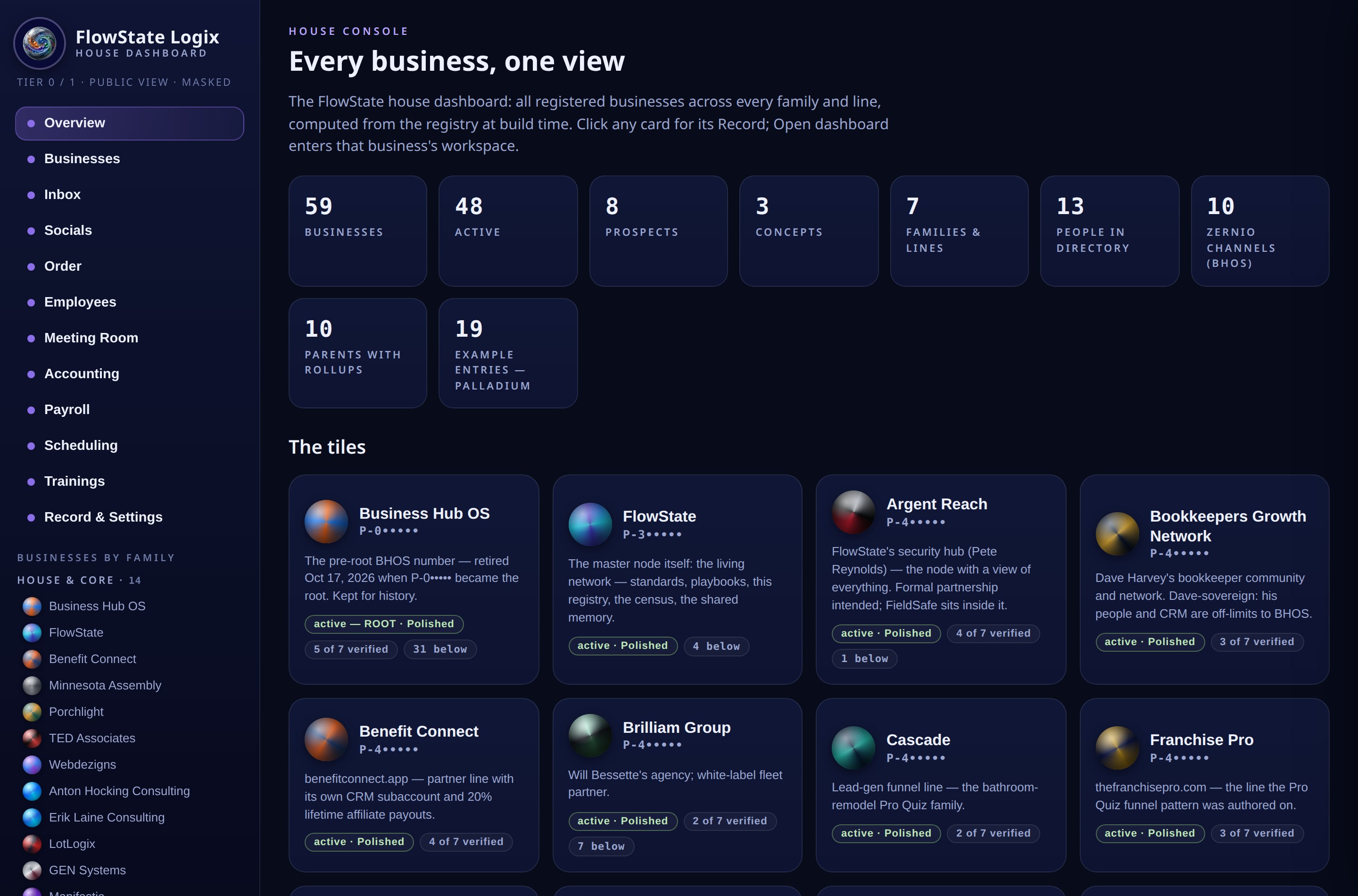 Click to open the full view
Every screen an owner lives in.
This is the FlowState dashboard, walked screen by screen: the overview, the workspace, the books, the roster, the week, the meeting room. Each stop shows the screen the way an owner sees it, then says plainly what it does and what it surfaces.
All of your companies, one screen
The home screen is a tile for every company, drawn as a marble in that company's own colors. Status reads at a glance: polished means active, and the small counts along the top say how many companies, people, and things need a look today. Clicking a tile opens that company's card; the card opens its workspace. Nothing on this screen is decorative. Every number on it is computed from the companies below it.
Ownership stops being a list of logins. One screen holds the whole family, and the three things that need attention are named before you go looking for them.
Inside one company
Open a company and you are standing in its workspace: the same tile pattern, one level down. CRM, inbox, website, bookings, media, documents, people, money. Every workspace in the family is shaped the same way, so moving from the dental practice to the coffee roaster costs nothing to learn. A new capability arrives as a tile on the Solutions shelf, activated when the business is ready for it.
The system teaches itself. Learn one workspace and you have learned all of them, which is what makes a second, fifth, or twentieth company cheap to run.
The parent sees the whole family
A holding company gets an inside view of everything below it. Each company is a tile with its full record behind it, and the figures at the top are rolled up live from the companies themselves: group revenue, group payroll, people, and the short list of companies that need a check this week.
A portfolio stops reporting upward in spreadsheets. The parent reads one consolidated picture that is only ever as old as the last transaction in any company.
The pipeline, without leaving the dashboard
The CRM lives inside the workspace as a look-in: stages across, leads as cards, totals on top. Brightpath's board shows new patient inquiries moving toward booked consults and agreed plans, with recalls due counted before they slip. The button from here opens the full CRM record for anyone who needs the deep view.
Pipeline health becomes a glance instead of a report someone has to build. Nine new inquiries this week is a fact on the screen, not a number from last month's meeting.
One inbox, marbles for the company, badges for the channel
Social messages, calls and texts, and team messages arrive in a single list. Each conversation carries the marble of the company it belongs to, and a small badge riding on the marble names the channel it arrived on: Instagram, WhatsApp, Telegram, Facebook, a call or text, or the team itself, with the channel named in text beside it. Filters split the stream when you want one kind at a time, and replies go out from the company the customer wrote to.
Nobody checks five apps to answer one customer. The bakery asking for a second wholesale bag and the patient with a chipped tooth sit in the same queue, each wearing the right company's colors.
The roster is the spine
Every company keeps one roster, and the roster is what the rest of the system stands on. Scheduling schedules the people on it. Payroll counts them. Trainings track against them. One record per person, shared by every module, so a name is spelled the same way in the rota, the pay run, and the training log.
Most small companies keep their people in four places that disagree. Here the roster is a single source, and everything downstream inherits its accuracy.
Click a person, open their vault
Behind every roster row is a vault: the person's folder inside the company. Profile, documents and credentials, this week's schedule, their trainings with states and dates, and their payroll picture, all in one place. A vault is visible by role: the person, their manager, and group operations. It is never company-wide by default.
When someone asks where Sofia's food handler certificate is, or whether she finished the safety training, the answer is one click and it is the same answer everywhere.
Build the week, post it once
The schedule is built on the roster: people down the side, days across, shifts placed as blocks in each company's colors. When the week is right, posting it sends it to the team in one action and stamps the grid as posted, with who posted it and when. What you see here is Brightpath's posted week.
The rota stops living in a group chat screenshot. It is built once, posted once, and the same hours later feed payroll without being typed again.
Your provider, your four facts
Payroll connects at the layer that fits the company: a link to the provider it already uses, a sync that pulls the key facts in, or an embedded service under the company's own name. The provider stays the system of record for taxes and filings. The dashboard keeps the four facts an owner actually checks: next pay date, headcount, last total, and whether anything needs attention.
Across eight companies there could be eight providers, and it stops mattering. Every one of them reports the same four facts into the same screen, and those totals feed the books.
Books that keep themselves current
Bank accounts and cards connect once, and transactions stream into a review queue. The assistant proposes a category for each one from the company's own chart of accounts. A named person approves, because books are legal records and nothing posts silently. From the approved ledger come the reports: profit and loss, cash flow, and the recurring charges quietly adding up.
Month end stops being an excavation. The P&L on this screen is October to date, and the same statement rolls up to the parent, which no stack of separate bookkeeping files can do.
A library of tiles, dated and tracked
Trainings live as a library: each one a tile with its posted date, its kind, and its completion picture. It starts with a few real entries and grows tile by tile. Completion is tracked per employee, assigned, watched, completed, with dates, so the library also answers who has actually done the training and who has not.
Training stops being a folder of videos nobody can account for. Thirteen of fourteen on safety basics is a fact, and the fourteenth name is on the roster screen.
Meetings live inside the work
Every company has a meeting room on the same pattern as the group room shown here: status at a glance, then Start, Join, and Invite as the only three actions. Meeting controls sit inside the workspace, scoped to the company you are standing in, not off on a separate site someone has to remember.
The room belongs to the company, so the conversation, the recording consent, and the follow-ups stay attached to the business they were about.
Branded goods, ordered from the kit
Business cards, shirts, hats, and the rest of the physical kit live here. Each product is prepared from the company's own Media Kit and Brand Guide, so a reorder carries the right logo, the right colors, and for cards, the right person's details pulled from their Vault. Nobody re-uploads artwork, and nothing goes out off brand.
The brand stops depending on whoever remembers where the logo file is. The kit is the brand, and ordering is just choosing quantities.
FlowState Logix · Dashboard tour. Every company, person, and figure in the tour belongs to the fictional Aldergate family and exists for demonstration only. The dashboard views at the top are the real product, publicly masked.
Attach your socials, see them all
The Socials screen is a grid: every company down the side, every channel across the top. Connected channels show their audience as the network reports it. A channel that is not attached says so plainly, with the connect action right there. Attaching a channel is how a company's posts, messages, and numbers start flowing into the rest of the dashboard.
The gaps are the value. One look shows that the events company has no YouTube and the landscaping crew has no LinkedIn, which is a work list, not a mystery.